Project deep-dive

Boring Old CRM

BoringOldCRM

Boring by default. · Powerful when needed.

A production-grade, multi-tenant CRM built from scratch — schema-per-tenant isolation, an always-on AI assistant, and fully configurable data models without deployments.

Overview

BoringOldCRM is a personal project born out of a desire to explore what a truly well-architected, modern CRM could look like — one that is opinionated about isolation and reliability but highly flexible in how each tenant models their data and business rules.

The name is intentional. Good software should be predictable and boring at the operational level, even when the engineering underneath is anything but. Every feature exists to solve a real problem rather than to be clever.

It is a fully functional application, publicly available at bocrm.rsalvador.dev.

This is a personal project built for learning and scratching the architecture itch — not for commercial use.
38+ Backend Services
20 Custom Field Types
3 LLM Providers
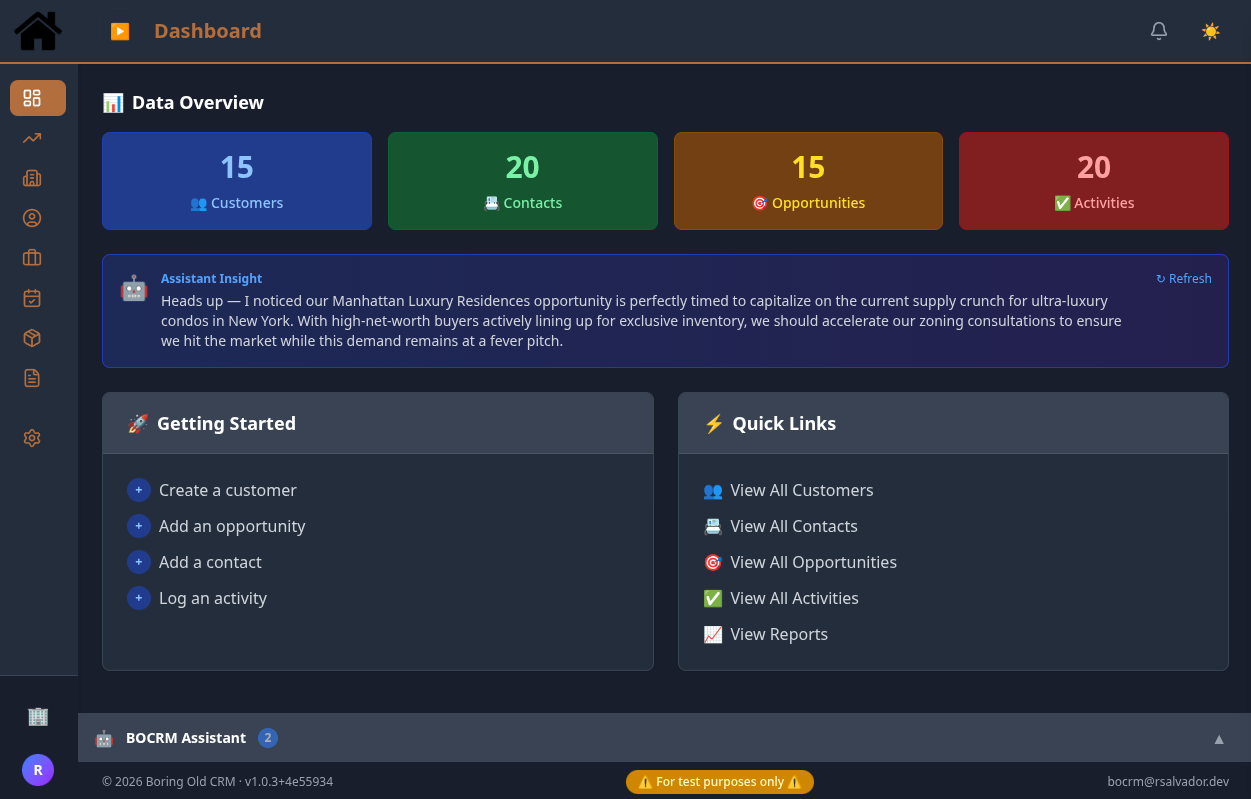
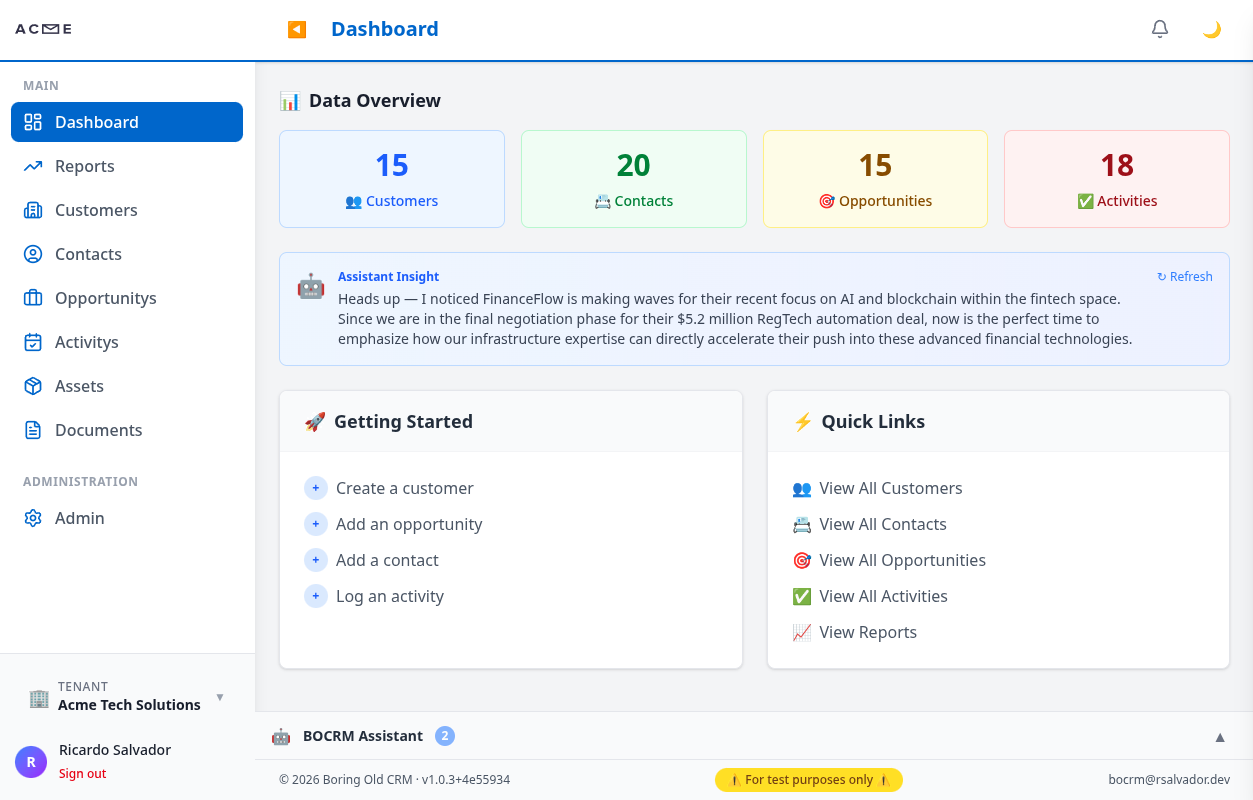
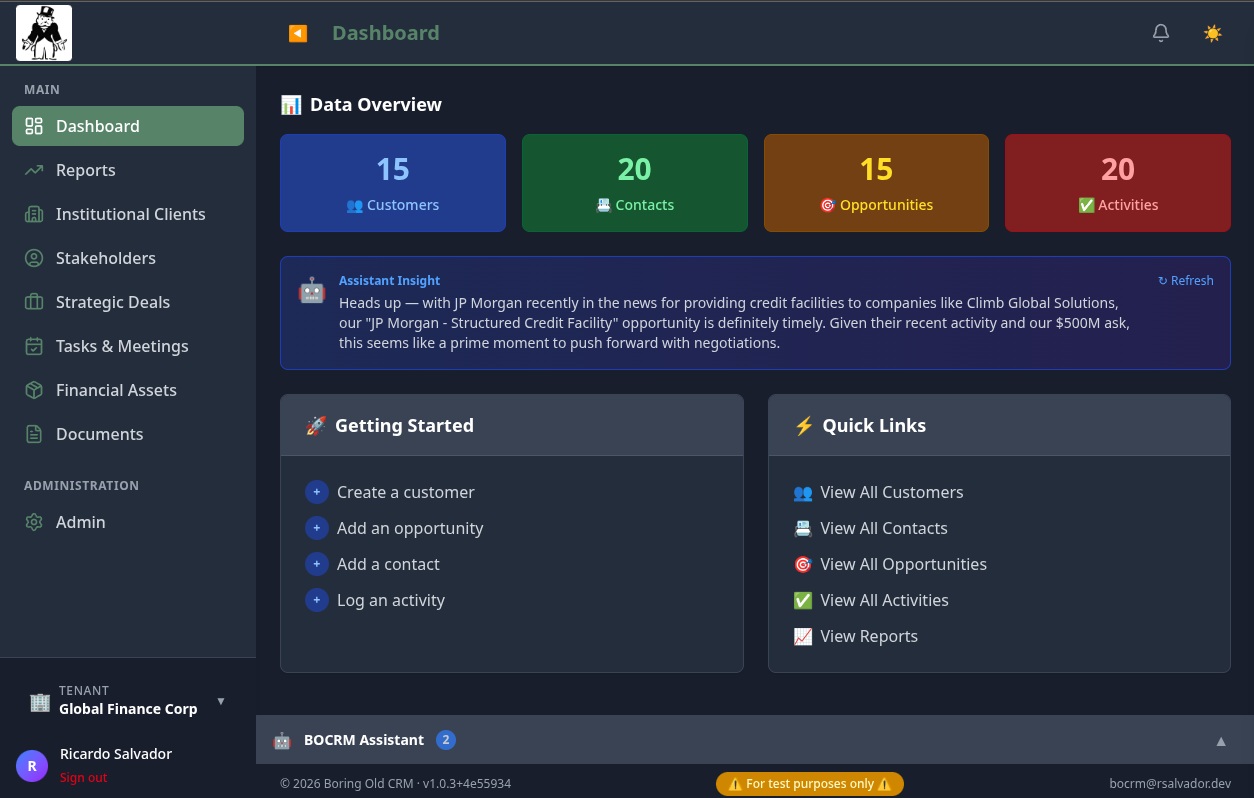
Acme Tech Solutions Dashboard Global Financial Corp Dashboard Real Estate Ventures Dashboard
Dashboard — Multi-tenant Setups (click to expand)
Acme Tech Solutions Dashboard Global Financial Corp Dashboard Real Estate Ventures Dashboard
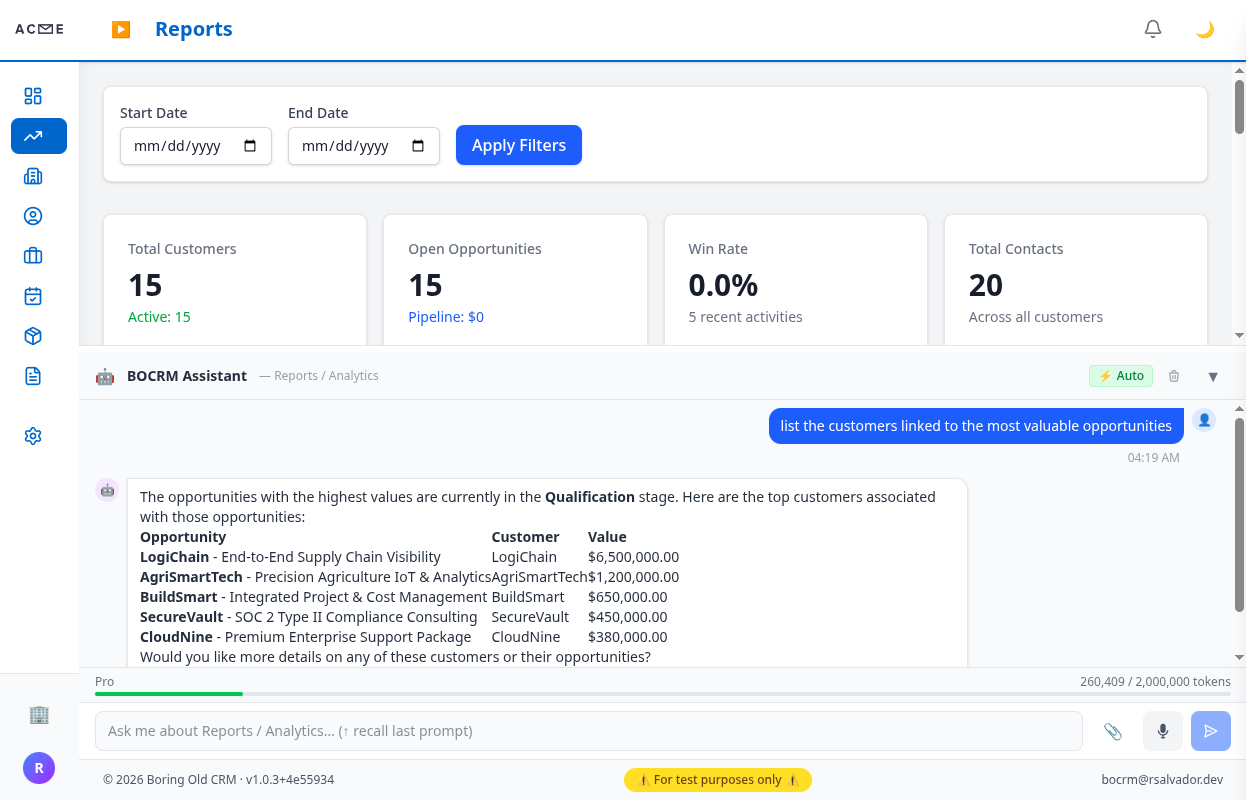
AI Assistant - Acme Tech Solutions AI Assistant - Global Financial Corp AI Assistant - Real Estate Ventures
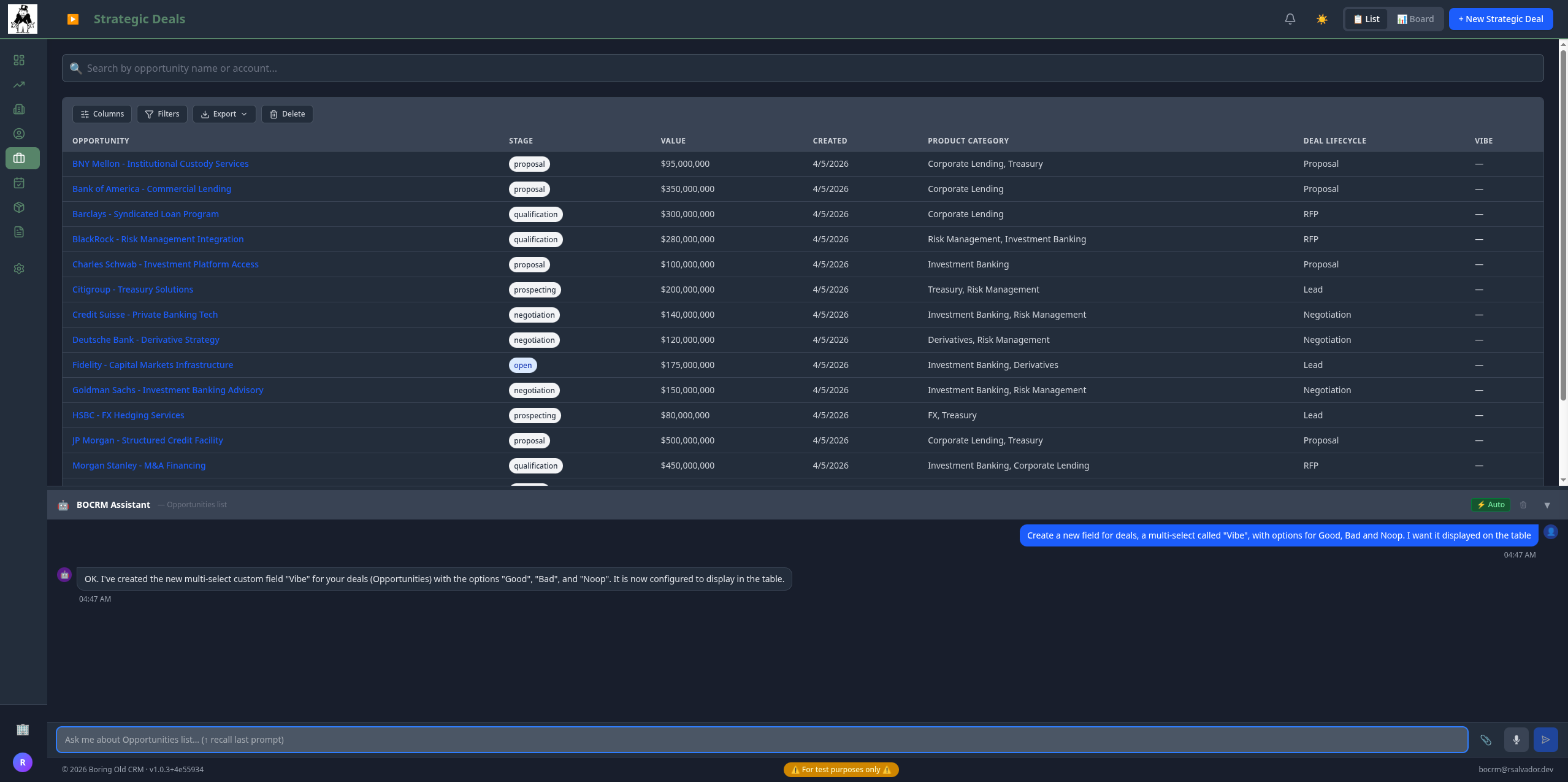
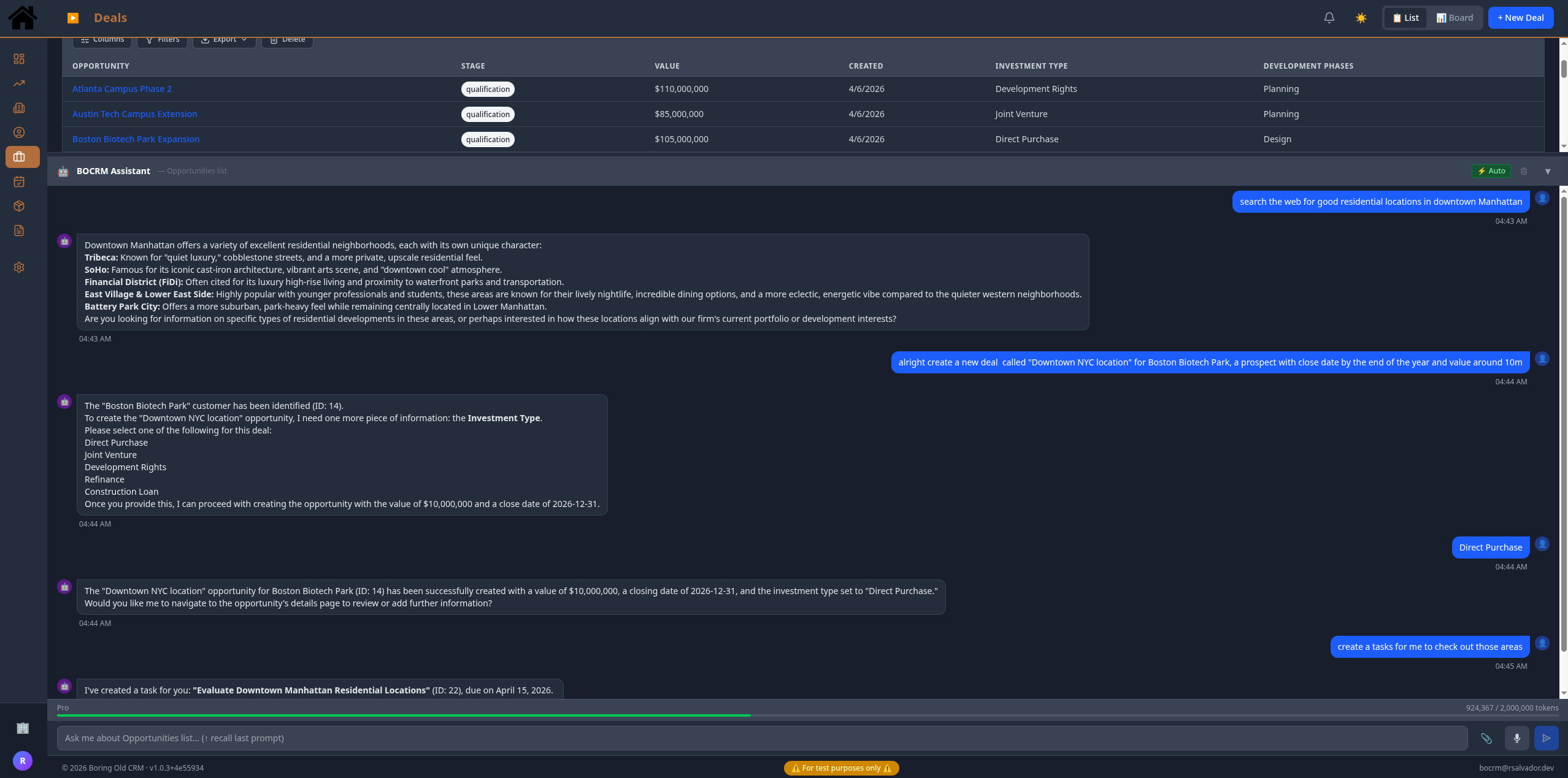
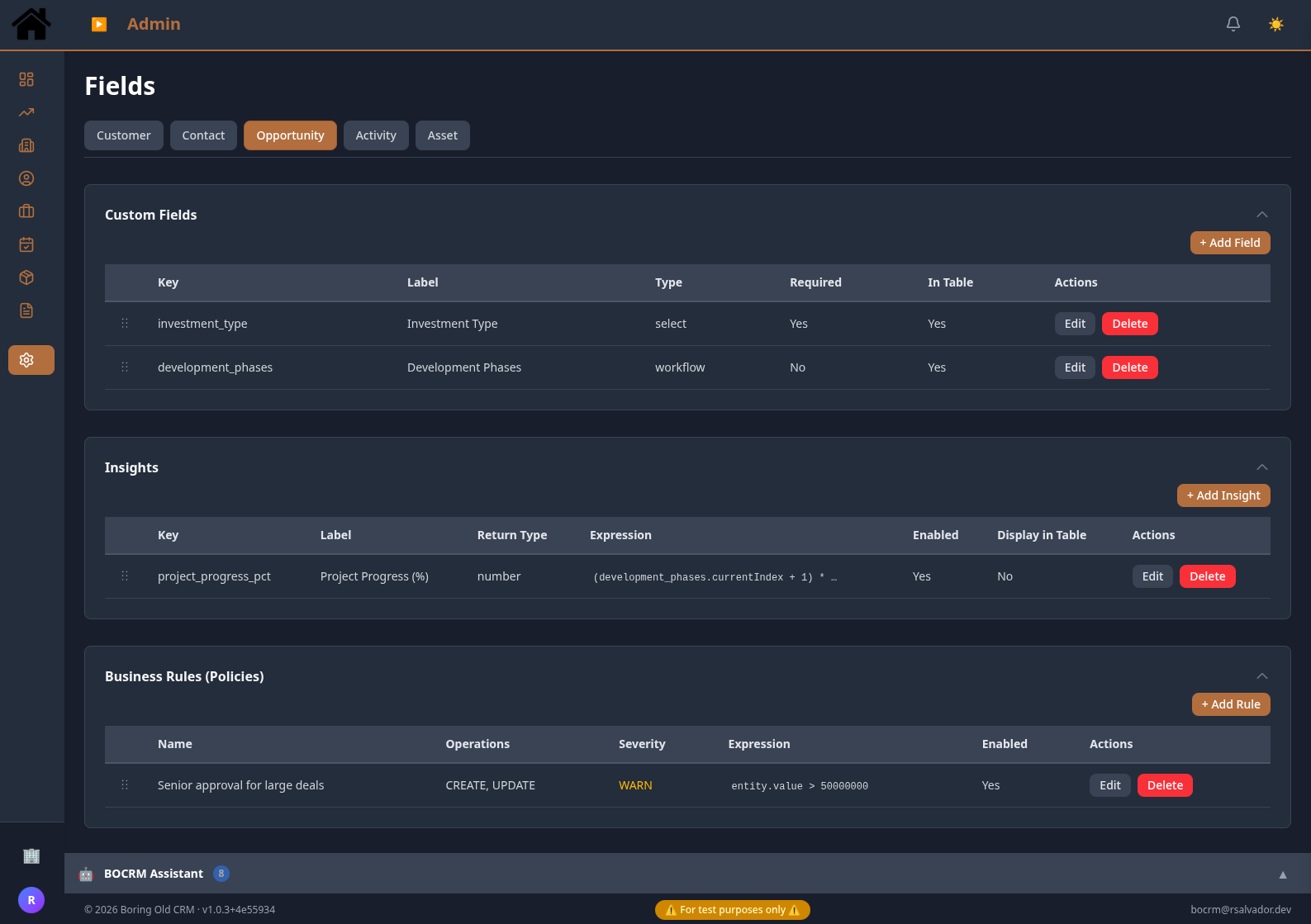
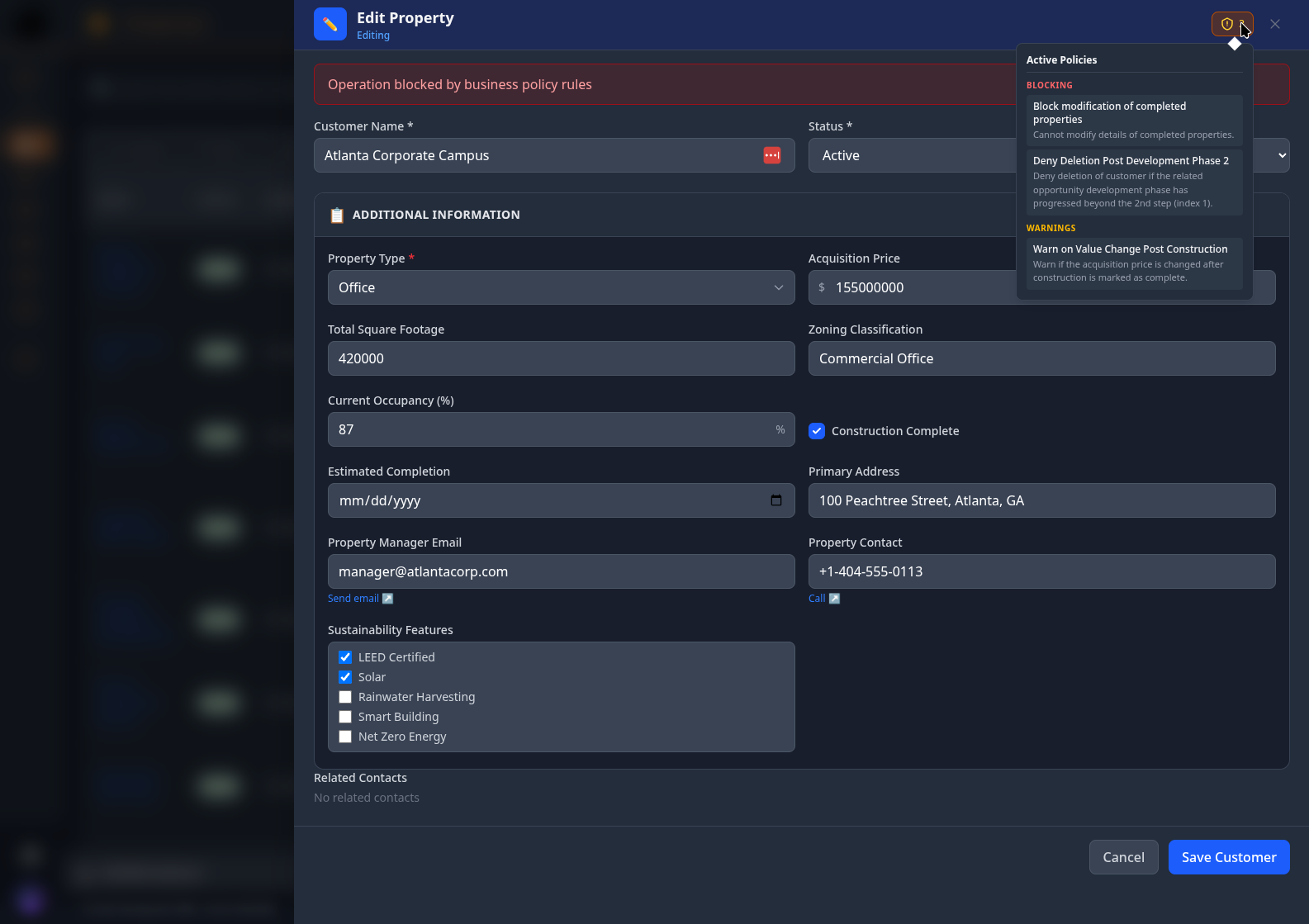
Custom Fields and Insights Custom Fields - Insights - Policies Policy and Insights in Action Policy Deny Action
🔗

Integration Framework

Keep your team's tools in sync — automatically

What it does

Connect BOCRM to the tools your team already lives in. Whenever a record is created, updated, or deleted, the relevant systems are notified automatically — no manual exports, no stale spreadsheets.

Events are committed alongside the data change in a single transaction, so nothing is lost even if an external system is temporarily unavailable. (Outbox pattern under the hood.)

Supported connections

Slack

Post formatted messages to any channel the moment a deal closes, a contact is added, or an activity is logged.

HubSpot

Mirror BOCRM records into HubSpot — customers become companies, contacts stay contacts, opportunities map to deals.

Webhooks

Send a raw HTTP payload to any URL — useful for in-house systems and custom automations. Optional signature verification included.

Zapier

Route events through Zapier to trigger any of 7,000+ apps — no custom code needed on your end.

What triggers an event

Any create, update, or delete action across the four core entity types: Customers, Contacts, Opportunities, and Activities — 12 event types in total. Each integration lets you subscribe to only the events you care about.

Reliability & control

  • Nothing gets lost — events are stored before delivery, so a brief outage on the receiving end doesn't drop data
  • Credentials are encrypted at rest — API keys and webhook secrets are never stored in plain text (AES-256-GCM)
  • Per-tenant isolation — each workspace configures its own connections independently
  • Pause without deleting — toggle any integration off and back on without losing its configuration
  • Visibility on failures — failed deliveries surface in the admin UI for inspection and retry
🛡️

Policy Rules Engine

Enforce your business rules — without touching code

What it does

Every team has rules that shouldn't exist only in someone's memory or an onboarding doc. This engine lets you encode them directly in the product — and enforce them automatically on every save, from every surface.

Rules come in two modes: Block (the action is refused with your message) or Warn (the user sees a confirmation prompt and can proceed if they choose).

What it looks like in practice

  • Block closing an opportunity below your minimum deal size
  • Warn before reassigning a record to an inactive team member
  • Prevent deleting a customer that still has open activities
  • Require a note to be filled in before marking a deal as won
  • Restrict status from moving backwards — only forward transitions allowed

Enforced on both sides

Rules fire on the frontend before the form is submitted — users see feedback instantly. The same rules also run server-side on every write, so there's no way to bypass them through the API or any other client.

Powered by Open Policy Agent

Rules are expressed as Rego condition bodies and evaluated by an Open Policy Agent sidecar. Each rule is validated against OPA before it's saved — invalid expressions are rejected immediately with a clear error. When a rule is enabled, updated, or deleted, the Rego document for that tenant and entity type is pushed to OPA automatically, so enforcement is always in sync with the database.

Rules can reference the full record state — input.entity.* for new values, input.previous.* for what it was before the change, and input.operation to target specific actions. Evaluation is fail-closed: if OPA is unreachable, the write is blocked.

The assistant writes the expressions for you

You don't need to know Rego syntax. Describe the rule you want in plain language — "warn if someone closes a deal worth more than $50k without a note" — and the assistant translates it into a working Rego expression, ready to enable. You can also ask it to explain an existing rule or suggest new ones based on your current data model.

Managing rules

  • Write rules for any of the five entity types: Customer, Contact, Opportunity, Activity, Asset
  • Target any combination of create, update, or delete actions
  • Pause a rule without deleting it — useful for testing or seasonal exceptions
  • Drag to reorder — rules fire in the sequence you define
🔒

Row-Level Access Control

Control who can see or edit each record — not just each role

What it does

Most permission systems work at the role level — either you can see all opportunities, or none. This goes further: each record can have its own visibility setting, so a strategic deal can be locked down to its owner while routine pipeline stays open to the whole team.

Visibility modes

  • Private — only the record owner can see and edit it
  • Team — visible to everyone on the owner's team
  • Workspace — anyone in the tenant can view it (read-only)
  • Custom — hand-pick specific users or groups, each with their own access level

How access is granted

Individual grants

Give a specific user view or edit access to a single record without changing their overall role.

Group grants

Grant access to a named group — everyone in that group inherits it, and the grant updates automatically as membership changes.

Manager override

Users with the manager role can always see and edit any record, regardless of its visibility setting.

Where it applies

Opportunities, Activities, Assets, and Documents — any entity type where ownership matters. Hidden records are filtered out of list views entirely, not just greyed out. (Enforced at the query level, not the UI layer — so it can't be bypassed via API.)

🏢

Schema-per-Tenant Isolation

Your data is separate — not just filtered, but physically partitioned

Why it matters

Most multi-tenant SaaS products store all customers in the same tables and use a WHERE tenant_id = ? filter to keep data separate. That works — until one missing filter clause exposes the wrong tenant's data.

BOCRM takes a different approach: each workspace gets its own isolated database namespace. There are no shared tables to accidentally query across, and no application-level filters to forget. The isolation is structural.

What this means in practice

  • No cross-tenant leakage is possible — not through bugs, misconfigured queries, or overlooked edge cases
  • Each workspace evolves independently — schema migrations apply per-tenant, with no risk of breaking a neighbour
  • Simpler compliance story — complete data separation makes GDPR data deletion, residency requirements, and audit scoping straightforward
  • Failure containment — a corrupted or misbehaving tenant namespace doesn't touch any other
  • No query overhead — no partition pruning or shared-table filtering; each tenant queries only its own data

New workspaces provision automatically

When a new tenant is created, the system provisions their isolated namespace, runs the full database migration suite, and seeds default configuration — document templates, example policies — all in the background. The workspace is ready to use immediately.

For the technically curious

The current implementation uses PostgreSQL schemas named tenant_<id>. Every database request carries the tenant identity from the JWT through a ThreadLocal context, and the ORM routes the connection to the correct schema automatically via SET search_path. The isolation pattern itself is database-agnostic — MySQL, SQL Server, and Oracle can express the same separation with equivalent mechanisms.

🤖

Always-On AI Assistant

Talk to your CRM — search, update, generate, import

What you can do

  • Find anything — search across customers, contacts, deals, and activities in plain language
  • Create and update records — including custom field values, without navigating to a form
  • Generate documents — slide decks, one-pagers, and CSV exports built from live CRM data on request
  • Import from files — drop a CSV, PDF, or image into the chat and the assistant proposes records to create
  • Manage configuration — add custom fields, write policy rules, or adjust workflows via conversation

Import from files

Attach a file directly in the chat input. The assistant reads it, extracts what's relevant, and proposes a list of records to create — all before writing a single thing. You confirm, it creates.

CSV

Each row becomes a proposed record — customers, contacts, opportunities, or activities. Create them all with one confirmation.

PDF

Useful for importing proposals or contracts. The assistant extracts names, companies, deal values, and dates.

Images

Business cards, screenshots, scanned forms — the assistant reads the image and pulls out contact and company data.

5 MB limit per attachment. Files are sent inline to the model — no separate upload endpoint or storage required.

Always confirms before writing

The assistant never creates, updates, or deletes anything without showing you what it plans to do first. You review the proposed changes, then confirm. This applies to single records and bulk imports alike.

Model choice per workspace

The platform administrator enables models at the platform level and assigns them to subscription tiers. Each workspace admin then picks their preferred model from whatever their tier makes available. Three providers are supported:

Anthropic Claude

Available on higher tiers — strong at reasoning and long document analysis.

OpenAI GPT

Available on standard and above — well-rounded for general CRM tasks.

Google Gemini

Available on all tiers — cost-effective option for everyday queries.

Usage controls

  • Platform admin controls which models are available at the system level
  • Models are gated by subscription tier — each tier unlocks a different set
  • Monthly token usage tracked and enforced per workspace
  • Usage visible in tenant analytics so admins can monitor spend
🧩

20 Custom Field Types

Model your data your way — no engineering required

What it does

Every team tracks different things. A sales team might need contract value, close probability, and a custom stage workflow. A support team needs SLA tier and escalation owner. Custom fields let each workspace add exactly the fields it needs to any record type — from the admin UI, instantly.

All values are stored as flexible JSON on the record itself — so adding a new field never requires a database migration or a deployment. (JSONB column per entity.)

Standard field types (13)

Text, long text, rich text, email, phone, URL, number, currency, percentage, date, yes/no toggle, dropdown (single), and multi-select — covering virtually every simple data shape.

Relationship types (6)

  • Document and Document (multiple) — link a record to one or more uploaded documents
  • Asset and Asset (multiple) — attach physical or digital assets to any record
  • Contact and Contact (multiple) — cross-reference contacts within the same workspace

Workflow fields

A workflow field is a milestone tracker — you define the stages (e.g. "Lead → Prospect → Meeting → Proposal → Won"), and the field renders as an interactive progress stepper on each record. Users can advance, skip ahead, or revert directly from the record view.

Calculated fields and policy rules can reference workflow progress, so you can build logic like "warn if a deal moves to Proposal without a completed meeting milestone."

Field management

  • Reorder fields by dragging — controls display order in forms and detail views
  • Mark fields as required, or set min/max constraints on numeric types
  • Full audit trail on every custom field change
  • The AI assistant can create and modify field definitions via chat
⚙️

Calculated Fields

Derived values that update automatically — and appear in list views at no extra cost

What it does

A calculated field holds a formula. Every time a record is saved, the formula runs and the result is stored on the record. It can reference any native field, any custom field, and even workflow milestone progress — all from the admin UI with no code required.

Not sure how to write the expression? Describe what you want in the chat — "a field that shows expected revenue as deal value times probability" — and the assistant writes the formula, creates the field, and sets the output type. You just confirm.

A few examples

  • value × probability ÷ 100 — weighted revenue, updated every time the deal value or probability changes
  • stage is "closed_won" → "Won", "closed_lost" → "Lost", else "Active" — a human-readable status label derived from an internal stage code
  • industry is "Tech" and value > 50,000 → "High", else "Normal" — a priority tier that combines two fields
  • mrr × 12 × (1 − churn_rate ÷ 100) — projected ARR derived from two custom number fields
  • sales_stage milestone ≥ 3 → "Advanced", else "Early" — a label driven by a workflow field's current milestone index

Shows up in list views automatically

Toggle Display in Table on any calculated field and it appears as a column in the list view for that entity. The value is pre-computed and stored directly on the record — so the list view reads it without any extra queries or joins.

Turn this on for an existing field and all historical records are recalculated in the background automatically. No manual backfill step.

Works with policy rules

Policy rules can reference the output of a calculated field — so you can write a rule like "block saving if the weighted revenue drops below $10,000" without duplicating the formula in each place.

Operational details

  • Output can be declared as text, number, boolean, or date — the UI renders accordingly
  • Pause any field without deleting it
  • Drag to reorder — controls column and display ordering
  • Create, edit, or delete fields from the admin UI at any time — no deployments needed
📄

AI Document Generation

Turn CRM records into formatted documents — without copy-pasting

What it does

Ask the assistant to generate a document about any record and it pulls the live data, formats it, and stores the result — ready to share. No manual exports, no reformatting in another tool.

Output formats

Slide decks

A formatted HTML presentation built from a customer or opportunity record — useful for QBRs, pitch prep, or status updates.

One-pagers

A concise executive summary of a record — good for account briefings, deal reviews, or handoff notes.

CSV export

A full data export of any entity type, including all custom fields as columns. Useful for sharing data with teams or tools outside the CRM.

Just describe what you want

The entire generation flow happens through the assistant. Ask for a slide deck on an account, specify the audience, mention any sections to include or exclude, and it handles the rest. You can direct the output conversationally — "make it more concise", "use the light template", "exclude the custom fields section" — without touching a settings panel.

Templates and branding

Each workspace can save reusable document templates with a colour scheme, layout preset, and field selection — so generated documents consistently reflect the workspace's brand without configuring it each time. Four default templates are provided out of the box.

The assistant lists available templates before generating and picks the most relevant one, or asks if it's not obvious.

Custom fields included

CSV exports automatically include all custom field columns — the system scans all records first to discover every field key in use, so no column is missed even if not every record has the same fields populated.

Stored and tracked

  • Every generated document is saved to the workspace's document library
  • Linked back to the source record it was generated from
  • Full audit trail of who generated what, and when
🔔

Reliable Notifications

Stay informed on what changes — without notification fatigue

What it does

When something changes in the CRM — a deal is created, a contact is updated, an activity is logged — the relevant people are notified. Users control exactly what they want to hear about, and through which channel.

Delivery channels

  • In-app — a notification inbox inside the CRM, with an unread count badge
  • Email — SMTP delivery for users who prefer notifications outside the app
  • Mobile push — on the roadmap

Per-user preferences

  • Subscribe or unsubscribe from specific event types individually
  • Choose between immediate delivery or a daily digest
  • Set a preferred channel — in-app only, email only, or both
  • Configure quiet hours to avoid notifications outside working hours

Nothing gets lost

Notification events are written to the database in the same transaction as the record change — so even if the notification service restarts mid-flight, no events are silently dropped. Failed deliveries are retried automatically and surfaced for inspection if they keep failing.

(Outbox pattern: events commit alongside mutations, a background poller dispatches them with exponential backoff.)

💡

AI Dashboard Insights

One observation about your pipeline, every time you open the dashboard

What it does

A small AI-generated card lives on the dashboard. It reads the workspace's current pipeline and surfaces one meaningful observation — a deal that's close to closing, an opportunity that's been stalled, a pattern in recent activity. Not a report, not a chart — just one useful thing to notice.

Grounded in real-world context

For active workspaces, the insight includes relevant news alongside the pipeline data. The system looks up recent articles about the workspace's top customers and highest-value deals, so observations can reference what's actually happening in those companies' markets — not just what's in the CRM.

New workspaces get onboarding help

When a workspace has no records yet, the card switches to setup mode — suggesting 2–3 concrete first steps based on what hasn't been configured yet. Once records are added, it switches over to pipeline observations automatically.

Practical details

  • Insights are cached per workspace for one hour — opening the dashboard repeatedly doesn't call the LLM each time
  • A Refresh button forces a new generation on demand
  • If the primary LLM provider is unavailable, the system tries the next one automatically — Anthropic, OpenAI, and Gemini are all in the rotation
🔌

MCP Protocol Support

Access your CRM from AI tools outside the app — without switching tabs

What it does

BOCRM exposes its full CRM read/write capability through the Model Context Protocol — an open standard that lets AI tools interact with external systems. If you use Claude Desktop or any MCP-compatible AI client, you can access the CRM directly from that tool's chat interface without opening BOCRM at all.

(MCP is to AI agents what REST is to web apps — a standard contract for tools to call external systems.)

What you can do from an MCP client

  • Look up customers, contacts, and deals without leaving your AI assistant
  • Create or update records through a conversation — with the same access controls and audit trail as the UI
  • Build autonomous workflows that read from and write to the CRM on a schedule or trigger
  • Chain CRM actions with other MCP-enabled tools — GitHub, Slack, and others

Works with

Claude Desktop

Add BOCRM as an MCP server in your Claude Desktop config — then manage the CRM in the same conversation where you do everything else.

Custom agents

Build bots that automate prospecting, qualification follow-ups, or deal hygiene — fully autonomous, same data model.

Any MCP client

The server implements the open MCP specification, so it works with any compatible tool — current or future.

Same isolation, same rules

MCP access goes through the same tenant context, access control checks, and audit logging as the UI. Nothing is bypassed. Each workspace authenticates via a dedicated API key.

🌐

Multi-Source Intelligence

The AI assistant knows what's happening in your customers' markets — not just your pipeline

What it does

When the AI generates insights or answers questions, it can pull in live context from outside the CRM — recent news, market signals, and industry events — so its observations are grounded in what's actually happening, not just the data you've entered.

What that looks like in practice

  • The dashboard insight card mentions that a key customer just announced a funding round — relevant to that stalled renewal
  • The assistant flags that an industry you sell into is seeing regulatory headwinds before you ask about it
  • Recommended timing for a follow-up is informed by a recent product launch at the prospect's company
  • Pipeline summaries note which deals are with companies showing growth signals vs. those showing contraction

How context is selected

The system doesn't fetch generic news — it builds a targeted query from the workspace's actual pipeline. The highest-value open opportunity, the most recently active customer, the top account names. That specificity is what makes the context useful rather than noise.

Privacy

  • Only company names and industry terms are used in news queries — no contact PII is sent externally
  • News data is fetched on demand and not stored persistently
  • All external API calls are audit-logged

Features

🏢

Schema-per-Tenant Isolation

Dedicated DB namespace per tenant — cross-tenant leakage is structurally impossible with no row filters to forget.

🤖

Always-On AI Assistant

Full CRM control via chat — search, create, update, generate docs, and bulk-import data from file attachments. Tenant admins pick their LLM by subscription tier.

🧩

20 Custom Field Types

20 configurable types — primitives, relationship links (document, asset, contact), and milestone workflow trackers — stored as JSONB, no deployments.

⚙️

Calculated Fields

Unlimited derived values per entity — arithmetic, conditionals, status labels — auto-denormalized into table views with no deployments.

🛡️

Policy Rules Engine

Tenant-defined DENY/WARN rules with dual-layer enforcement — client-side preview and server-side hard block — authored entirely in the UI with no deployments.

🔒

Row-Level Access Control

Per-record visibility modes with explicit user and group grants, enforced on every query — no hidden records slipping through list endpoints.

📄

AI Document Generation

Generate slide decks, one-pagers, and CSV exports from live CRM data using tenant-defined style templates.

🔔

Reliable Notifications

Outbox pattern guarantees zero lost events — email and in-app delivery via RabbitMQ with per-user preferences.

💡

AI Dashboard Insights

Per-tenant AI observations with real-time news context, surfacing pipeline signals and customer trends on the dashboard.

🔗

Integration Framework

One-way event push to Slack, HubSpot, Webhooks, and Zapier — AES-256-GCM encrypted credentials, guaranteed at-least-once delivery via outbox.

🔌

MCP Protocol Support

Exposes full CRM read/write via Model Context Protocol — Claude Desktop or any MCP agent with the same tenant isolation and audit trail as the UI.

🌐

Multi-Source Intelligence

AI assistant enriched with real-time news and market data for context-aware pipeline recommendations and customer insights.

AI Assistant - Acme Tech Solutions AI Assistant - Global Financial Corp AI Assistant - Real Estate Ventures
AI Assistant — Multi-tenant Setups (click to expand)

Architecture

Described using the C4 model — four levels of zoom from system context down to code-level patterns.

System Context

Who uses the system and what external systems does it depend on. BOCRM serves three distinct user roles and integrates with external LLM providers, SMTP, and OIDC identity providers.

%%{init: {'theme': 'base', 'themeVariables': {'fontSize': '16px', 'fontFamily': 'Inter, ui-sans-serif, sans-serif', 'lineColor': '#a5b4fc', 'primaryTextColor': '#e2e4ea', 'primaryColor': '#1e2330', 'primaryBorderColor': '#6366f1', 'secondaryColor': '#252b3b', 'tertiaryColor': '#181c26', 'background': '#0d0f14', 'person_bg_color': '#1e2330', 'person_border_color': '#34d399', 'personFontSize': '16', 'personFontWeight': '600', 'system_bg_color': '#1a1f35', 'system_border_color': '#6366f1', 'systemFontSize': '16', 'external_system_bg_color': '#111827', 'external_system_border_color': '#4b5563', 'systemdb_bg_color': '#1a1f35', 'systemdb_border_color': '#fbbf24', 'systemqueue_bg_color': '#1a1f35', 'systemqueue_border_color': '#fb923c', 'boundaryfontsize': '14', 'messageFontSize': '13', 'messageFontWeight': '500'}}}%%
C4Context
    title BOCRM — System Context

    Person(user, "CRM User", "Sales · support · operations")
    Person(admin, "Tenant Admin", "Fields · rules · users")
    Person(sysadmin, "System Admin", "Tenants · platform config")

    System_Boundary(platform, "BOCRM Platform") {
        System(bocrm, "BOCRM", "Multi-tenant CRM")
    }

    SystemDb(db, "Postgres", "Tenant + shared schemas")
    SystemQueue(mq, "RabbitMQ", "Async event bus")
    System_Ext(llm, "LLM Providers", "Claude · OpenAI · Gemini")
    System_Ext(email, "SMTP", "Email delivery")
    System_Ext(oidc, "OIDC", "External SSO")

    Rel(user, bocrm, "Uses", "HTTPS")
    Rel(admin, bocrm, "Administers", "HTTPS")
    Rel(sysadmin, bocrm, "Manages", "HTTPS")
    Rel(bocrm, db, "Reads/Writes", "JDBC")
    Rel(bocrm, mq, "Pub/Sub", "AMQP")
    Rel(bocrm, llm, "AI prompts", "HTTPS")
    Rel(bocrm, email, "Sends", "SMTP")
    Rel(bocrm, oidc, "Tokens", "HTTPS")

    UpdateLayoutConfig($c4ShapeInRow="3", $c4BoundaryInRow="1")
            

Containers

The deployable units that make up the system. A React SPA communicates with a Spring Boot API, which coordinates with the data stores, message broker, and an OPA sidecar. Policy rules are pushed to OPA as Rego documents on every change and evaluated via HTTP on every write.

%%{init: {'theme': 'base', 'themeVariables': {'fontSize': '15px', 'fontFamily': 'Inter, ui-sans-serif, sans-serif', 'lineColor': '#a5b4fc', 'primaryTextColor': '#e2e4ea', 'primaryColor': '#1e2330', 'primaryBorderColor': '#6366f1', 'secondaryColor': '#252b3b', 'tertiaryColor': '#181c26', 'background': '#0d0f14', 'person_bg_color': '#1e2330', 'person_border_color': '#34d399', 'container_bg_color': '#1e2330', 'container_border_color': '#6366f1', 'containerFontSize': '15', 'containerdb_bg_color': '#1a1f35', 'containerdb_border_color': '#fbbf24', 'containerqueue_bg_color': '#1a1f35', 'containerqueue_border_color': '#fb923c', 'external_system_bg_color': '#111827', 'external_system_border_color': '#4b5563', 'boundaryfontsize': '14', 'messageFontSize': '13'}}}%%
C4Container
    title BOCRM — Containers

    Person(user, "CRM User / Admin", "Uses CRM and admin UI")
    Person(sysadmin, "System Admin", "Platform management")

    Container_Boundary(platform, "BOCRM Platform") {
        Container(web, "Web App", "React 19 · Vite · TS", "SPA — CRM, dashboards, AI chat")
        Container(api, "Backend API", "Spring Boot 4 · Java 21", "REST — auth, CRM, policies, AI")
        Container(worker, "Background Worker", "Spring Boot", "Outbox, notifications, backups")
        Container(ai, "AI Orchestrator", "Spring AI", "Chat tools, doc gen, insights")
        ContainerDb(oltp, "Postgres OLTP", "Postgres 15", "Admin + per-tenant schemas")
        ContainerDb(report, "Reporting Store", "Postgres", "Rollup aggregates")
        ContainerQueue(mq, "RabbitMQ", "AMQP", "Event bus · at-least-once")
        Container(opa, "OPA Sidecar", "Open Policy Agent", "Rego policy evaluation")
    }

    System_Ext(llm, "LLM Providers", "Claude · OpenAI · Gemini")
    System_Ext(email, "SMTP", "Email delivery")
    System_Ext(oidc, "OIDC", "External SSO")

    Rel(user, web, "Uses", "HTTPS")
    Rel(sysadmin, web, "Manages", "HTTPS")
    Rel(web, api, "REST calls", "JSON/HTTPS")
    Rel(api, oltp, "Reads/Writes", "JDBC")
    Rel(api, mq, "Publishes", "AMQP")
    Rel(worker, mq, "Consumes", "AMQP")
    Rel(worker, oltp, "Reads/Writes", "JDBC")
    Rel(worker, report, "Writes rollups", "JDBC")
    Rel(worker, email, "Sends", "SMTP")
    Rel(ai, llm, "LLM prompts", "HTTPS")
    Rel(api, oidc, "Validates", "HTTPS")
    Rel(api, opa, "Evaluates policies", "HTTP")

    UpdateLayoutConfig($c4ShapeInRow="3", $c4BoundaryInRow="1")
            

Multi-Tenancy Design

Each tenant is provisioned a dedicated isolated namespace (tenant_<id>). Hibernate SCHEMA mode routes every request through a TenantContext ThreadLocal — no shared tables, no partition keys, no query-level filters to miss. The pattern is database-agnostic — currently implemented with PostgreSQL schemas, but Hibernate's multi-tenancy layer means swapping to MySQL databases or SQL Server schemas requires only configuration changes. Tenant bootstrapping runs a full Flyway migration on the new schema automatically.

Screenshot — Tenant Administration

Replace with a screenshot of the tenant admin panel or a diagram showing schema isolation. Good candidate: tenant setup flow or the schema-per-tenant diagram from your architecture docs.

Components

The major modules inside the Spring Boot API. Each module owns its own domain, repository layer, and service boundary. Cross-cutting concerns (tenancy, auth, audit) are handled via Spring aspects and filters.

---
config:
  layout: elk
  theme: base
  elk:
    mergeEdges: true
    nodePlacementStrategy: NETWORK_SIMPLEX
  themeVariables:
    fontSize: 14px
    fontFamily: "Inter, ui-sans-serif, sans-serif"
    primaryColor: "#1e2330"
    primaryTextColor: "#e2e4ea"
    primaryBorderColor: "#6366f1"
    lineColor: "#a5b4fc"
    secondaryColor: "#252b3b"
    tertiaryColor: "#181c26"
    background: "#0d0f14"
    edgeLabelBackground: "#1e2330"
    clusterBkg: "#181c26"
    clusterBorder: "#6366f1"
    nodeTextColor: "#e2e4ea"
---
flowchart TB
    WEB(["Web App · React 19"])

    subgraph API["Backend API — Spring Boot 4 · Java 21"]
        direction TB

        subgraph AUTHN["Auth & Tenancy"]
            direction TB
            AUTH["Auth · JWT · OIDC"]
            TEN["Tenancy · Schema routing"]
            SA["System Admin"]
            TA["Tenant Admin"]
        end

        subgraph CRMD["CRM Domain"]
            direction TB
            CRM["CRM Core · CRUD · Search"]
            ASS["Assets"]
            DOC["Documents"]
            BLK["Bulk Ops"]
        end

        subgraph EXT["Extensibility"]
            direction TB
            CF["Custom Fields · JSONB"]
            CLF["Calculated Fields · CEL"]
            PR["Policy Rules · OPA/Rego"]
            OT["Opportunity Types"]
            DT["Doc Templates"]
        end

        subgraph SEC["Access & Security"]
            direction TB
            AC["Access Control"]
            UG["User Groups"]
            AUD["Audit Log"]
        end

        subgraph AIG["AI & Insights"]
            direction TB
            CHAT["AI Chat · Spring AI"]
            INS["Dashboard Insight"]
        end

        subgraph OPS["Operations"]
            direction TB
            NOT["Notifications"]
            RPT["Reporting"]
            OB["Outbox Publisher"]
            BAK["Tenant Backup"]
        end

        %% Force vertical stacking of subgroups
        AUTHN ~~~ CRMD
        CRMD ~~~ EXT
        EXT ~~~ SEC
        SEC ~~~ AIG
        AIG ~~~ OPS
    end

    WEB -->|REST| AUTH
    AUTH --> TEN
    CRM --> CF & PR & AC

    API --> PG[("Postgres")]
    OB --> MQ(["RabbitMQ"])
    CHAT & INS --> LLM(["LLM Providers"])

    classDef module fill:#1e2330,stroke:#6366f1,color:#e2e4ea
    classDef external fill:#111827,stroke:#374151,color:#9ca3af
    class AUTH,TEN,SA,TA,CRM,ASS,DOC,BLK,CF,CLF,PR,OT,DT,AC,UG,AUD,CHAT,INS,NOT,RPT,OB,BAK module
    class WEB,PG,MQ,LLM external
            

Frontend Components

---
config:
  layout: elk
  theme: base
  elk:
    mergeEdges: true
    nodePlacementStrategy: NETWORK_SIMPLEX
  themeVariables:
    fontSize: 14px
    fontFamily: "Inter, ui-sans-serif, sans-serif"
    primaryColor: "#1e2330"
    primaryTextColor: "#e2e4ea"
    primaryBorderColor: "#7c3aed"
    lineColor: "#a5b4fc"
    secondaryColor: "#252b3b"
    tertiaryColor: "#1a1530"
    background: "#0d0f14"
    edgeLabelBackground: "#1e2330"
    clusterBkg: "#1a1530"
    clusterBorder: "#7c3aed"
    nodeTextColor: "#e2e4ea"
---
flowchart TB
    API(["Backend API · REST"])

    subgraph WEB["Web App — React 19 + Vite + TypeScript"]
        direction TB

        APIC["API Client · Axios"]

        subgraph STORES["State — Zustand"]
            direction TB
            AUTHS["authStore"]
            UIS["uiStore"]
            CRMS["crmStore"]
            FS["Field Stores"]
        end

        subgraph PAGES["Pages"]
            direction TB
            PC["CRM Pages"]
            PA["Admin Pages"]
            PSA["System Admin"]
            PAU["Auth Pages"]
        end

        subgraph COMPS["Shared Components"]
            direction TB
            FORMS["Form Components"]
            VIEWS["View Components"]
            TABLE["DataTable"]
            KAN["KanbanBoard"]
            ASST["AssistantBar"]
            CFI["CustomFieldInput"]
            ACP["AccessControlPanel"]
        end

        STORES ~~~ PAGES
        PAGES ~~~ COMPS
    end

    API -->|REST| APIC
    PC & PA & ASST --> APIC
    FORMS --> FS
    PC --> AUTHS
    ASST --> UIS

    classDef comp fill:#1e2330,stroke:#7c3aed,color:#e2e4ea
    classDef external fill:#111827,stroke:#374151,color:#9ca3af
    class APIC,AUTHS,UIS,CRMS,FS,PC,PA,PSA,PAU,FORMS,VIEWS,TABLE,KAN,ASST,CFI,ACP comp
    class API external
            

Key Design Decisions

Schema-per-Tenant SQL-level isolation with no query filters to miss; each tenant namespace evolves independently via Flyway. Database-agnostic pattern — currently PostgreSQL schemas, switchable to MySQL or SQL Server through Hibernate configuration.
OPA/Rego Policy Engine Tenant-defined DENY/WARN rules are expressed as Rego condition bodies and evaluated by an Open Policy Agent sidecar. Rego documents are synced to OPA on every rule change and on startup. Expressions are validated against OPA before saving — invalid Rego is rejected with a clear error. Policy evaluation is fail-closed: OPA unavailability returns HTTP 500.
Outbox Pattern Events written transactionally alongside mutations — never lost on crash. RabbitMQ consumer processes with retry.
JSONB Custom Fields Tenant extensions need zero schema migrations. Field metadata in relational rows; values as JSONB blobs.
CEL for Expressions Calculated fields use Common Expression Language — safe, sandboxed, runtime-evaluable without deployments.
Modular Monolith Clear domain boundaries within a single deployable. Splitting to microservices later is a packaging decision.
Multi-Provider LLM Spring AI abstracts Anthropic, OpenAI, and Gemini. Per-tenant model selection with per-request fallback routing.
Zero-Deployment Config Custom fields + CEL calculated field expressions + OPA/Rego policy rules give tenants full control over data models, derived values, and business rules — entirely from the UI, with no code changes or release cycles.

Code-Level Patterns

Key implementation patterns that underpin the system's reliability and extensibility.

TenantContext A ThreadLocal populated by a Spring filter on every request. Hibernate's CurrentTenantIdentifierResolver reads it to route all queries to the correct schema — zero chance of cross-tenant bleed.
OutboxPublisher An @TransactionalEventListener(BEFORE_COMMIT) writes domain events to an outbox table in the same transaction as the mutation. A separate scheduler polls and publishes to RabbitMQ, then marks delivered.
PolicyValidationService Called in all five CRM services on CREATE/UPDATE/DELETE. Delegates to OpaEvaluator, which POSTs the entity context (input.entity.* + input.previous.* + input.operation) to the OPA sidecar. DENY violations throw immediately; WARNs are collected and returned. A separate evaluateOnly() path handles frontend pre-submit checks without throwing. Rego documents are kept in sync via OpaSyncService, which pushes updated policies after each DB commit.
CelEvaluator Wraps Google's CEL-Java library. Field definitions carry a CEL expression string; the evaluator compiles it once, caches the program, and executes it against the record's field map on every write.
CustomFieldMapper On read, deserializes the JSONB blob into a typed Map<String, FieldValue> using the tenant's field definitions as the schema. On write, validates types and serializes back. No generated columns, no EAV joins.
AiChatService Uses Spring AI's ChatClient with a registered tool set covering all CRM operations. Tools are resolved at runtime based on the tenant's enabled modules. Confirm mode buffers tool calls for user approval before execution.
Screenshot — Code / Architecture diagram

Replace with a sequence diagram or class diagram for one of the patterns above. Good candidate: the policy evaluation flow or the outbox publish sequence.

Data Model

Tables are split across two isolation tiers. The shared schema holds platform-level data (tenants, platform users). Each tenant gets a fully isolated tenant_<id> namespace for all CRM data — no shared tables, no cross-tenant joins possible. Currently implemented with PostgreSQL schemas; the Hibernate multi-tenancy layer makes this switchable to other databases through configuration.

CRM Core — tenant_<id> schema

The primary CRM entities. All reside in the tenant's isolated namespace — tenant_id columns exist in the physical tables but are omitted here for clarity since schema isolation already prevents cross-tenant access.

%%{init: {'theme': 'dark', 'themeVariables': {'fontSize': '14px', 'fontFamily': 'Inter, ui-sans-serif, sans-serif', 'primaryColor': '#1e2330', 'primaryBorderColor': '#6366f1', 'lineColor': '#a5b4fc', 'background': '#0d0f14', 'mainBkg': '#1e2330', 'nodeBorder': '#6366f1', 'clusterBkg': '#181c26', 'titleColor': '#e2e4ea'}, 'er': {'useMaxWidth': false, 'fontSize': 14, 'minEntityWidth': 500, 'entityPadding': 4}}}%%
erDiagram
    CUSTOMER {
        bigint id_ PK
        varchar name
        varchar status 
        bigint owner_id FK
        varchar industry 
        varchar website 
        jsonb custom_data
        timestamp created_at
    }
    CONTACT {
        bigint id PK
        bigint customer_id FK
        varchar name
        varchar email
        varchar phone
        varchar title
        boolean is_primary
        jsonb custom_data
    }
    OPPORTUNITY {
        bigint id PK
        bigint customer_id FK
        varchar name
        varchar stage
        numeric value
        numeric probability
        date close_date
        bigint owner_id FK
        varchar opp_type_slug
        jsonb custom_data
    }
    OPPORTUNITY_TYPE {
        bigint id PK
        varchar name
        varchar slug UK
        int display_order
    }
    OPPORTUNITY_CONTACT {
        bigint opportunity_id FK
        bigint contact_id FK
    }
    ACTIVITY {
        bigint id PK
        varchar subject
        varchar type
        timestamp due_at
        bigint owner_id FK
        varchar related_type
        bigint related_id
        varchar status
        jsonb custom_data
    }
    ASSET {
        bigint id PK
        varchar name
        varchar type
        varchar serial_number
        varchar status
        bigint customer_id FK
        bigint owner_id FK
        jsonb custom_data
    }
    ASSET_OPPORTUNITY {
        bigint asset_id FK
        bigint opportunity_id FK
    }

    CUSTOMER ||--o{ CONTACT : "has"
    CUSTOMER ||--o{ OPPORTUNITY : "has"
    CUSTOMER ||--o{ ASSET : "has"
    OPPORTUNITY_TYPE ||--o{ OPPORTUNITY : "typed as"
    OPPORTUNITY ||--o{ OPPORTUNITY_CONTACT : ""
    CONTACT ||--o{ OPPORTUNITY_CONTACT : ""
    ASSET ||--o{ ASSET_OPPORTUNITY : ""
    OPPORTUNITY ||--o{ ASSET_OPPORTUNITY : ""
            

Configuration — tenant_<id> schema

Tenant-controlled configuration tables: extensibility rules (custom fields, CEL calculated fields, OPA/Rego policy rules), access control, user groups, document templates, and saved filters.

Fields & Policies
%%{init: {'theme': 'dark', 'themeVariables': {'fontSize': '14px', 'fontFamily': 'Inter, ui-sans-serif, sans-serif', 'primaryColor': '#1e2330', 'primaryBorderColor': '#6366f1', 'lineColor': '#a5b4fc', 'background': '#0d0f14', 'mainBkg': '#1e2330', 'nodeBorder': '#6366f1', 'clusterBkg': '#181c26', 'titleColor': '#e2e4ea'}, 'er': {'useMaxWidth': false, 'fontSize': 14, 'minEntityWidth': 500, 'entityPadding': 4}}}%%
erDiagram
    CUSTOM_FIELD_DEFINITION {
        bigint id PK
        varchar entity_type
        varchar key
        varchar label
        varchar field_type
        jsonb config_jsonb
        int display_order
    }
    CALCULATED_FIELD_DEFINITION {
        bigint id PK
        varchar entity_type
        varchar key
        varchar label
        text expression
        int display_order
    }
    CALCULATED_FIELD_VALUE {
        bigint id PK
        varchar entity_type
        bigint entity_id
        bigint calc_field_id FK
        jsonb value
        timestamp created_at
    }
    POLICY_RULE {
        bigint id PK
        varchar entity_type
        varchar name
        text expression
        varchar action
        int display_order
    }

    CUSTOM_FIELD_DEFINITION ||--o{ CALCULATED_FIELD_DEFINITION : "references"
    CALCULATED_FIELD_DEFINITION ||--o{ CALCULATED_FIELD_VALUE : "produces"
            
Access Control
%%{init: {'theme': 'dark', 'themeVariables': {'fontSize': '14px', 'fontFamily': 'Inter, ui-sans-serif, sans-serif', 'primaryColor': '#1e2330', 'primaryBorderColor': '#6366f1', 'lineColor': '#a5b4fc', 'background': '#0d0f14', 'mainBkg': '#1e2330', 'nodeBorder': '#6366f1', 'clusterBkg': '#181c26', 'titleColor': '#e2e4ea'}, 'er': {'useMaxWidth': false, 'fontSize': 14, 'minEntityWidth': 500, 'entityPadding': 4}}}%%
erDiagram
    RECORD_ACCESS_POLICY {
        bigint id PK
        varchar entity_type
        bigint entity_id
        bigint owner_id FK
        varchar access_mode
    }
    RECORD_ACCESS_GRANT {
        bigint id PK
        varchar entity_type
        bigint entity_id
        varchar grantee_type
        bigint grantee_id
        varchar permission
    }
    USER_GROUP {
        bigint id PK
        varchar name
        varchar description
    }
    USER_GROUP_MEMBERSHIP {
        bigint group_id FK
        bigint user_id FK
    }

    RECORD_ACCESS_POLICY ||--o{ RECORD_ACCESS_GRANT : "grants"
    USER_GROUP ||--o{ USER_GROUP_MEMBERSHIP : "has"
    USER_GROUP ||--o{ RECORD_ACCESS_GRANT : "grantee"
            
Templates & Filters
%%{init: {'theme': 'dark', 'themeVariables': {'fontSize': '14px', 'fontFamily': 'Inter, ui-sans-serif, sans-serif', 'primaryColor': '#1e2330', 'primaryBorderColor': '#6366f1', 'lineColor': '#a5b4fc', 'background': '#0d0f14', 'mainBkg': '#1e2330', 'nodeBorder': '#6366f1', 'clusterBkg': '#181c26', 'titleColor': '#e2e4ea'}, 'er': {'useMaxWidth': false, 'fontSize': 14, 'minEntityWidth': 500, 'entityPadding': 4}}}%%
erDiagram
    DOCUMENT_TEMPLATE {
        bigint id PK
        varchar name
        varchar template_type
        jsonb style_json
        boolean is_default
    }
    NOTIFICATION_TEMPLATE {
        bigint id PK
        varchar name
        varchar notification_type
        varchar subject
        text body
    }
    SAVED_FILTER {
        bigint id PK
        bigint user_id FK
        varchar name
        varchar entity_type
        jsonb filter_config_jsonb
    }

    DOCUMENT_TEMPLATE ||--o{ NOTIFICATION_TEMPLATE : "used by"
            

Operations — tenant_<id> schema

Runtime and operational tables: AI chat history, document storage, notifications, immutable audit trail, outbox events (at-least-once delivery to RabbitMQ), backup jobs, and token usage ledger.

AI & Content
%%{init: {'theme': 'dark', 'themeVariables': {'fontSize': '14px', 'fontFamily': 'Inter, ui-sans-serif, sans-serif', 'primaryColor': '#1e2330', 'primaryBorderColor': '#6366f1', 'lineColor': '#a5b4fc', 'background': '#0d0f14', 'mainBkg': '#1e2330', 'nodeBorder': '#6366f1', 'clusterBkg': '#181c26', 'titleColor': '#e2e4ea'}, 'er': {'useMaxWidth': false, 'fontSize': 14, 'minEntityWidth': 500, 'entityPadding': 4}}}%%
erDiagram
    CHAT_MESSAGE {
        bigint id PK
        bigint user_id FK
        varchar role
        text content
        varchar context_entity_type
        bigint context_entity_id
        timestamp created_at
    }
    TENANT_DOCUMENT {
        bigint id PK
        varchar name
        varchar mime_type
        varchar content_type
        varchar linked_entity_type
        bigint linked_entity_id
        timestamp created_at
    }
    TOKEN_USAGE_LEDGER {
        bigint id PK
        bigint tokens_used
        varchar usage_type
        timestamp created_at
    }

    CHAT_MESSAGE ||--o{ TOKEN_USAGE_LEDGER : "consumes"
    CHAT_MESSAGE ||--o{ TENANT_DOCUMENT : "generates"
            
Audit, Events & Notifications
%%{init: {'theme': 'dark', 'themeVariables': {'fontSize': '14px', 'fontFamily': 'Inter, ui-sans-serif, sans-serif', 'primaryColor': '#1e2330', 'primaryBorderColor': '#6366f1', 'lineColor': '#a5b4fc', 'background': '#0d0f14', 'mainBkg': '#1e2330', 'nodeBorder': '#6366f1', 'clusterBkg': '#181c26', 'titleColor': '#e2e4ea'}, 'er': {'useMaxWidth': false, 'fontSize': 14, 'minEntityWidth': 500, 'entityPadding': 4}}}%%
erDiagram
    AUDIT_LOG {
        bigint id PK
        bigint user_id FK
        varchar action
        varchar entity_type
        bigint entity_id
        jsonb old_value
        jsonb new_value
        timestamp created_at
    }
    OUTBOX_EVENT {
        bigint id PK
        varchar event_type
        jsonb payload_jsonb
        int retry_count
        timestamp published_at
        timestamp created_at
    }
    NOTIFICATION_INBOX {
        bigint id PK
        bigint user_id FK
        varchar message_type
        varchar subject
        boolean is_read
        timestamp created_at
    }
    TENANT_BACKUP_JOB {
        bigint id PK
        varchar job_type
        varchar status
        boolean includes_data
        varchar label
        timestamp created_at
    }

    AUDIT_LOG ||--o{ OUTBOX_EVENT : "publishes"
    OUTBOX_EVENT ||--o{ NOTIFICATION_INBOX : "delivers"

            

Shared Schema — public

Platform-level tables managed by the system admin. Exist once per deployment — tenant registry, user accounts, AI tier config, and subscription tracking. Tenant schemas never join against these at query time.

%%{init: {'theme': 'dark', 'themeVariables': {'fontSize': '14px', 'fontFamily': 'Inter, ui-sans-serif, sans-serif', 'primaryColor': '#1e2330', 'primaryBorderColor': '#6366f1', 'lineColor': '#a5b4fc', 'background': '#0d0f14', 'mainBkg': '#1e2330', 'nodeBorder': '#6366f1', 'clusterBkg': '#181c26', 'titleColor': '#e2e4ea'}, 'er': {'useMaxWidth': false, 'fontSize': 14, 'minEntityWidth': 500, 'entityPadding': 4}}}%%
erDiagram
    TENANT {
        bigint id PK
        varchar name UK
        varchar external_org_id UK
        varchar status
        timestamp created_at
    }
    USER {
        bigint id PK
        varchar email UK
        varchar display_name
        varchar oauth_provider
        varchar oauth_id
        varchar status
        jsonb preferences
    }
    TENANT_MEMBERSHIP {
        bigint id PK
        bigint tenant_id FK
        bigint user_id FK
        varchar role
        timestamp joined_at
    }
    TENANT_SETTINGS {
        bigint id PK
        bigint tenant_id FK
        jsonb settings
    }
    TENANT_SUBSCRIPTION {
        bigint id PK
        bigint tenant_id FK
        bigint tier_id FK
        bigint tokens_used_this_period
        timestamp period_start_date
        timestamp period_end_date
    }
    ASSISTANT_TIER {
        bigint id PK
        varchar name UK
        varchar model_id
        varchar provider
        bigint monthly_token_limit
        numeric price_monthly
        boolean enabled
    }
    ENABLED_AI_MODEL {
        bigint id PK
        varchar provider
        varchar model_id
        boolean enabled
    }

    TENANT ||--o{ TENANT_MEMBERSHIP : "has"
    USER ||--o{ TENANT_MEMBERSHIP : "belongs to"
    TENANT ||--o{ TENANT_SETTINGS : "has"
    TENANT ||--o{ TENANT_SUBSCRIPTION : "subscribes"
    ASSISTANT_TIER ||--o{ TENANT_SUBSCRIPTION : "defines"
            
Custom Fields and Insights Custom Fields - Insights - Policies Policy and Insights in Action Policy Deny Action
Custom Fields & Policy Rules (click to expand)

Tech Stack

Backend

  • Java 21
  • Spring Boot 4
  • Spring Security
  • Hibernate (SCHEMA mode)
  • Flyway
  • Gradle

AI & LLMs

  • Spring AI Framework
  • Anthropic Claude
  • OpenAI
  • Google Gemini

Integration & Protocol

  • MCP (Model Context Protocol)
  • OpenAPI / REST
  • Open Policy Agent (OPA)

Frontend

  • React 19
  • TypeScript 5.9
  • Vite 7
  • Tailwind CSS 4
  • Zustand 5
  • React Router 7
  • Tiptap (rich text)

Data & Messaging

  • PostgreSQL 15
  • RabbitMQ 3
  • Redis 7

DevOps

  • Docker
  • Docker Compose
  • GitHub Actions
  • Gitleaks (secret scanning)
  • OpenAPI / Swagger
Back to portfolio